
Main Menu
Introduction
Section titled “Introduction”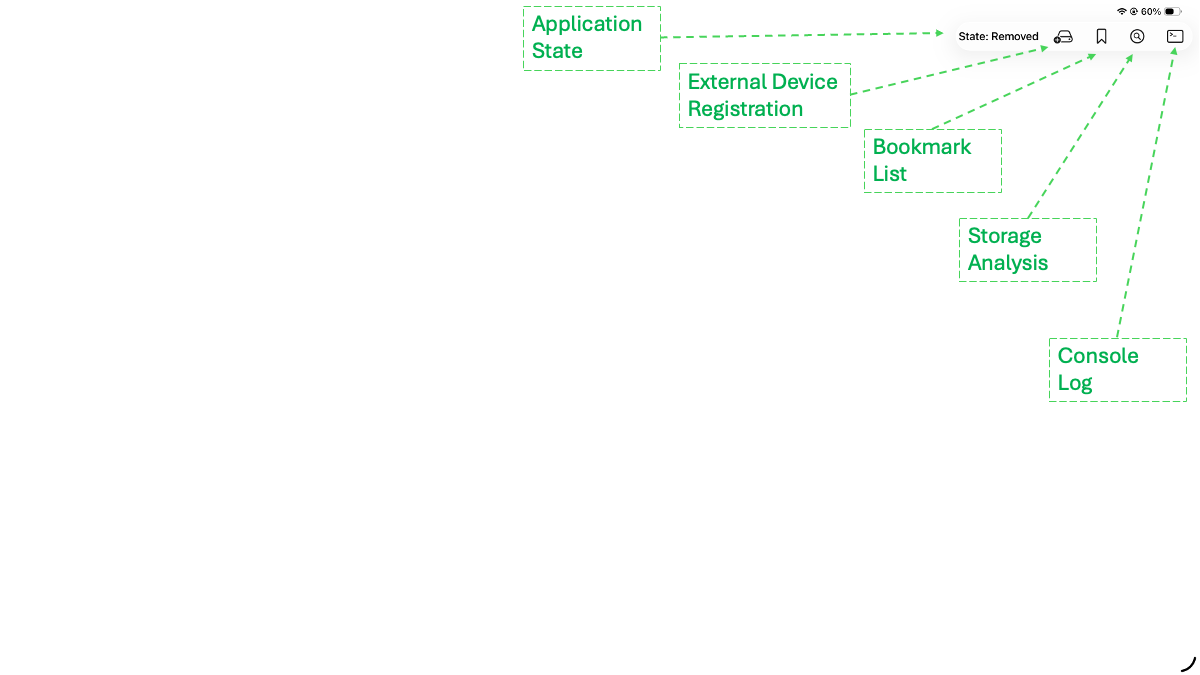
The main controls for PhotoImport are located at the top right of the main menu.
The first item in the controls is the workflow state. Use this to understand what is being shown on the rest of the screen and possible next steps:
o Initial - The screen may be blank or show thumbnails from the attached card. Nothing has been cached locally or backed up.
o Removed - The image card has been detached.
o Reading - The image card is being read - do not detach.
o ReadComplete - Card reading complete.
o Caching - The images are being cached locallly - do not disconnect the image card.
o Cached - The images have been cached locally the card can be disconnected.
o BackupReady - The images shown in the grid have been cached locally and a backup device has been recognized - ready for the cached images to be backed up.
o BackingUp - The cached images are being backed up - do not detach the backup device.
o BackedUp - The cached images shown in the grid have been backed up to the currently attached backup device.
o BackupOpen - Images have been read from the backup device - while the device remains connected they can be reviewed or exported to another application.
o Cleared - Images have been cleared using the “Clear” button and waiting for car, camera or backup device to be connected.
External Device Registration
Section titled “External Device Registration”iPad/iPhone applications have no way of detecting when empty storage devices are connected via the USB port. This function is used to register these devices so that they can be recognized automatically when connected in the future.
Bookmarks
Section titled “Bookmarks”A key feature of the PhotoImport application is that it remembers external devices such as image cards and backup SSDs.
The user gives permission for these devices to be accessed the first time they are attached to the application.
From that point onwards the application remembers the device and allows access without further security checks.
This function displays a list of bookmarks which can be selectively or globally cleared. It is good practice to clear bookmarks associated with devices which will no longer be used.
Storage Analysis
Section titled “Storage Analysis”This is a general storage analysis function and its content varies depending on the application state.
Console Log
Section titled “Console Log”This is intended to record application steps and can be used to help diagnose problems.